
 田辺勝裕
田辺勝裕
今はたくさんの動画生成AIがあり、その中から自分に合うサービスを選ぶのは大変です。
けれど、迷ったときはHiggsfield(ヒッグスフィールド)を選べば間違いありません。
なぜならHiggsfieldには以下の特徴があるからです。
- 画像生成、動画生成のどちらも可能(しかも高機能!)
- リップシンク機能もある
- 画像や動画の編集機能も備わっている
- 他社の画像生成AI・動画生成AIも使える
Higgsfieldは単体でも十分すぎるほど多機能です。
さらに、以下のサービスもサイト内から利用できるので、機能の豊富さでは世界トップと言っていいでしょう。

つまり、Higgsfieldひとつに登録すれば、かなり広い範囲までカバーできるのです。
まさに「オールインワン」の動画生成AIです。
他にも、Higgsfieldの大きな特徴として「カメラワーク」と「VFX」が挙げられます。
「カメラワーク」とは、動画内でカメラがズームしたり、被写体を追いかけたり、回転したりするような演出のことです。
Higgsfieldではカメラワークを簡単に設定でき、まるでCMや映画のようなダイナミックな映像を作ることができます。
下の動画は私がHiggsfieldで生成した動画です。
写真1枚アップロードし、カメラワークを指定するだけで、この動画を作れました。
「VFX」もHiggsfieldの特徴のひとつ。
VFXは「視覚効果」とも呼ばれ、映像にCGやエフェクトを加えて、現実では撮れない映像を作る技術のことです。
Higgsfieldを使えば、CGに関する知識がなくてもVFXを活用した動画を作れるようになります。
下の動画も私が作りましたが、とても簡単でした。
こちらも、写真1枚アップし、VFXを指定しただけです。
この記事ではHiggsfieldの特徴や使い方、さらにはHiggsfieldを使って生成した動画を解説・紹介します。
動画は私が作ったものだけでなく、2024年のProject Odysseyで優勝するなどの輝かしい実績を持つ
「ぽんず🐕 AIクリエイターさん」
が生成した動画も紹介します(ご本人から許可を得てXの投稿を引用しています)。
動画はカメラワークやVFX別で紹介するので、Higgsfieldを使う際はぜひ参考にしてください!
Higgsfield(ヒッグスフィールド)はどんな動画生成AI?
はじめに、Higgsfieldの全体的な概要を解説します。
| Higgsfield基本情報 | |
|---|---|
| 正式名称 | Higgsfield(ヒッグスフィールド) |
| 企業所在地 | アメリカ |
| おもな機能 | 動画生成、画像生成 |
| 無料クレジット | 1日10クレジット |
| 最も安いプランの料金 | 9ドル/1ヶ月 |
| 決済方法 | クレジットカード |
| 公式URL | https://higgsfield.ai/ |
最大の特徴は「機能の多さ」
Higgsfieldの最大の特徴は機能の豊富さです。
Higgsfieldが独自に開発した機能だけでも
- 画像生成
- 動画生成
- 動画編集
など、多岐にわたります。
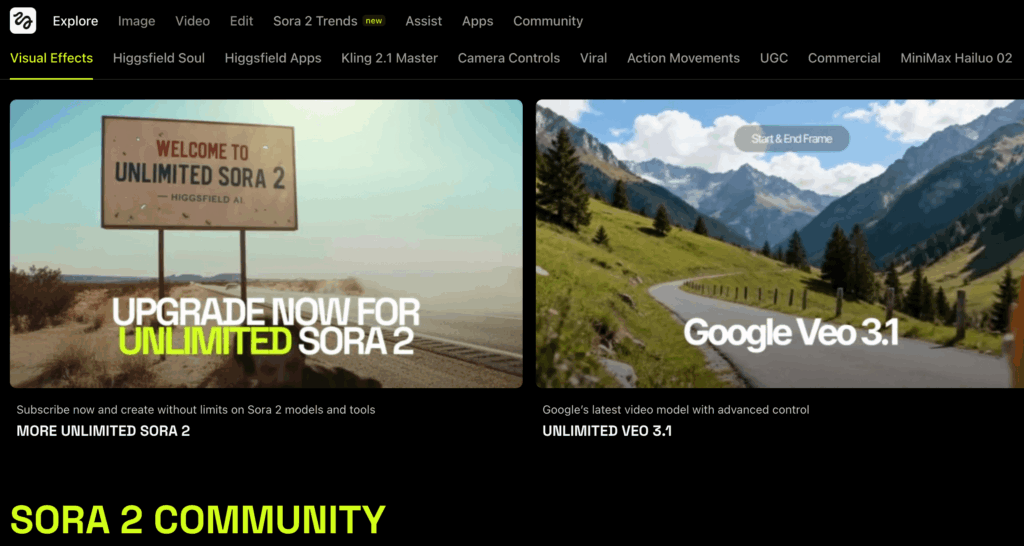
さらに、Higgsfieldは他の人気生成AIと提携しており、他社サービスも使えます。
2025年12月現在だと
- OpenAIのSora2
- GoogleのVeo3.1
- ByteDanceのWan2.5
- Kling 2.6・Kling O1
などのネットで大いに盛り上がった最新の動画生成モデルも使えます。
※いまUltimateプランに年間契約すると、Sora2やVeo 3.1 Fastが無制限で使い放題になります
画像生成に関しても
- GoogleのNano banana Pro
- ByteDanceのSeedream4.0
などの超人気モデルが使えます。
つまり、Higgsfieldひとつ利用するだけで最先端の動画生成AIをだいたい使えるようになるのです。
「どれを使っていいかわからない」
「課金する動画生成AIをひとつにまとめたい」
このような悩みがある場合、Higgsfieldに登録すれば解決します。
プロが作ったような動画を簡単に作れる
Higgsfieldが公開されたのは2025年の4月。
公開された途端、世界中のAIクリエイターから絶賛され、Xでもかなりの量の動画が拡散されました。
AIクリエイターが絶賛したのがカメラワークの「精度」と「多彩さ」です。
Higgsfieldには100種類以上のカメラワークが用意されています。
その中から選択するだけで(1つもしくは2つを指定可能)、カメラワークが動画に忠実に反映されます。
つまり、プロンプトでわざわざカメラの動きを指定する必要がないのです。
これは楽ですね。
実際にHiggsfieldで生成された動画を見てみましょう。
ドラゴンが加速する前のカメラワーク、まるで映画みたいですよね。
Higgsfieldを使うと、プロの映像クリエイターが作ったような迫力ある映像を簡単に作れます。
2025年6月からはリップシンク動画生成にも対応!
2025年6月からHiggsfieldはリップシンク動画も生成できるようになりました(使えるのはProプラン以上のユーザーのみ)。
リップシンク動画とは、AIアバターがしゃべる動画のことです。
これにより、MV(ミュージックビデオ)や映画を作りやすくなりました。
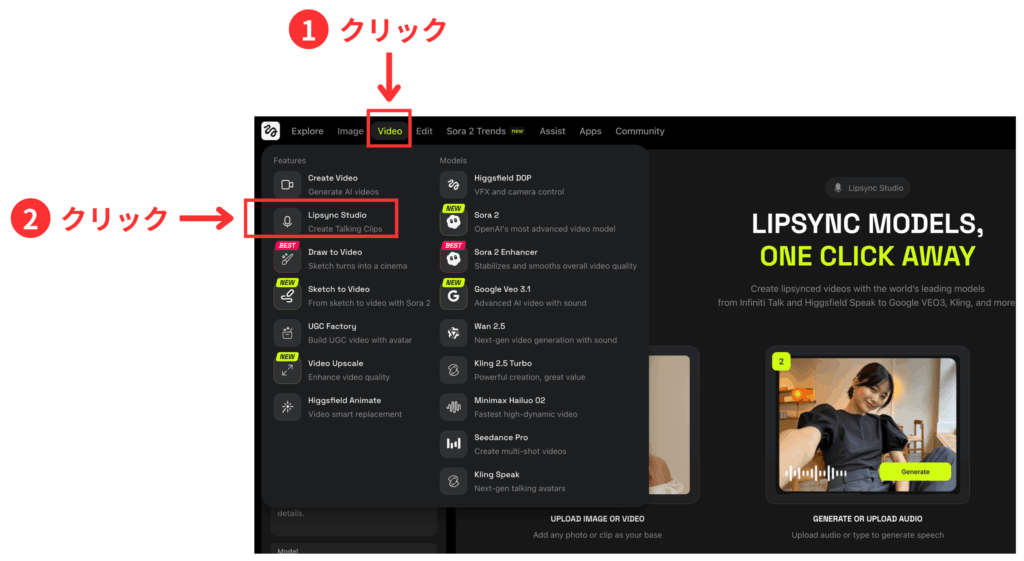
リップシンク動画は
「Lipsync Studio」
で作ることが可能です。
「Lipsync Studio」の場所は以下の画像を参考にしてください。
実際にHiggsfieldで生成したリップシンク動画はこちらで紹介しています。
プランごとの料金を紹介
Higgsfieldには4つの有料プランがあります。
それぞれがプランでもらえるクレジット・料金は以下の表で比較できます。
※1ヶ月プラン加入時の料金です
| プラン | 料金 | クレジット |
|---|---|---|
| Basic(ベーシック) | 9ドル | 150クレジット |
| Pro(プロ) | 29ドル | 600クレジット |
| Ultimate(ウルティメイト) | 49ドル | 1,200クレジット |
| Creator(クリエイター) | 249ドル | 6,000クレジット |
このうち、商用利用できるのはベーシックプラン以上の会員です。
最も安い有料プランなのに商用利用OKというのはかなり良心的です。
さらに出費を減らしたい場合は1ヶ月プランではなく12ヶ月プランへの加入を検討してください。
先ほどもお伝えしたように、Higgsfieldひとつに登録すればだいたい事足ります。
出費を減らして動画を作りたい場合、Higgsfieldの12ヶ月プランはかなり良い選択だと思います。
12ヶ月プランの料金は以下の画像を参考にしてください↓
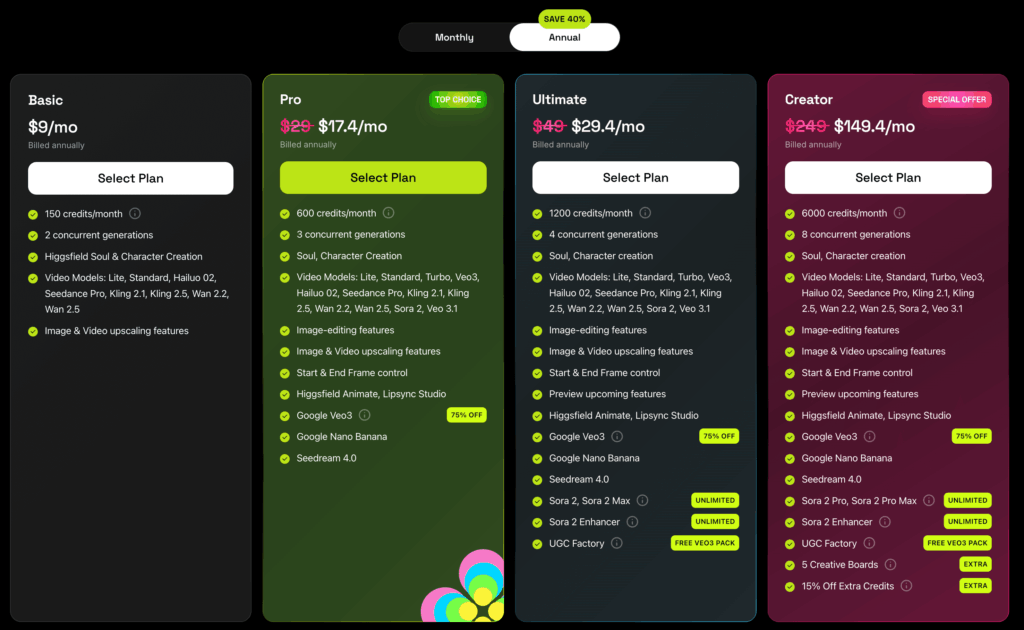
2025年12月現在、Ultimateプランに年間契約するとSora2やVeo3.1が無制限で使い放題になります。
動画クリエイターとして副業をしたり、動画生成AIを使ってクライアントワークをしたいと考えているなら、Ultimateプラン以上に課金すると結果的に出費を減らせるはずです。
無料会員でも毎日5クレジットもらえる
Higgsfieldの無料クレジットを解説します。
Higgsfieldは無料会員登録でも毎日10クレジットもらえます。
Higgsfieldでは動画1本(5秒)あたり5クレジット消費します(動画によってはもっと増えることもあります)。
よって無料会員でも動画を1日1本つくれます。
Higgsfieldの使い方!会員登録から動画生成までの流れ
ここからはHiggsfieldの使い方全般、具体的には
- 会員登録
- 画像生成
- 動画生成
などの方法を解説します。
Higgsfield会員登録の流れ【30秒で完了】
Higgsfieldの会員登録方法はシンプルです。
まずHiggsfield公式サイトにアクセスします。
そして「Sign up」をクリック。

次の画面ではアカウント登録方法を選びます。
メアドもしくはGoogleアカウントで登録できるので、お好きな方を選んでください。
私はGoogleアカウントで登録しました。

Higgsfield Soulで画像を生成する方法
Higgsfieldの画像生成は「Higgsfield Soul」と呼ばれています。
Higgsfield Soulで画像生成する方法を解説します。
画像生成するには、まず画面上部にある「Image」をクリックします。
そうすると、Higgsfield Soulが選択されます。
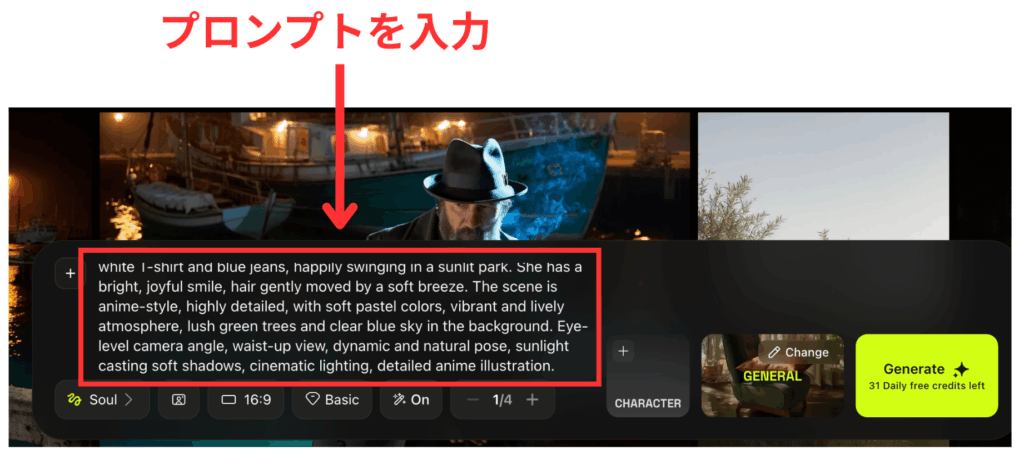
選択したらプロンプトを入力します。
日本語でも生成してくれますが、英語の方が良いと思います。
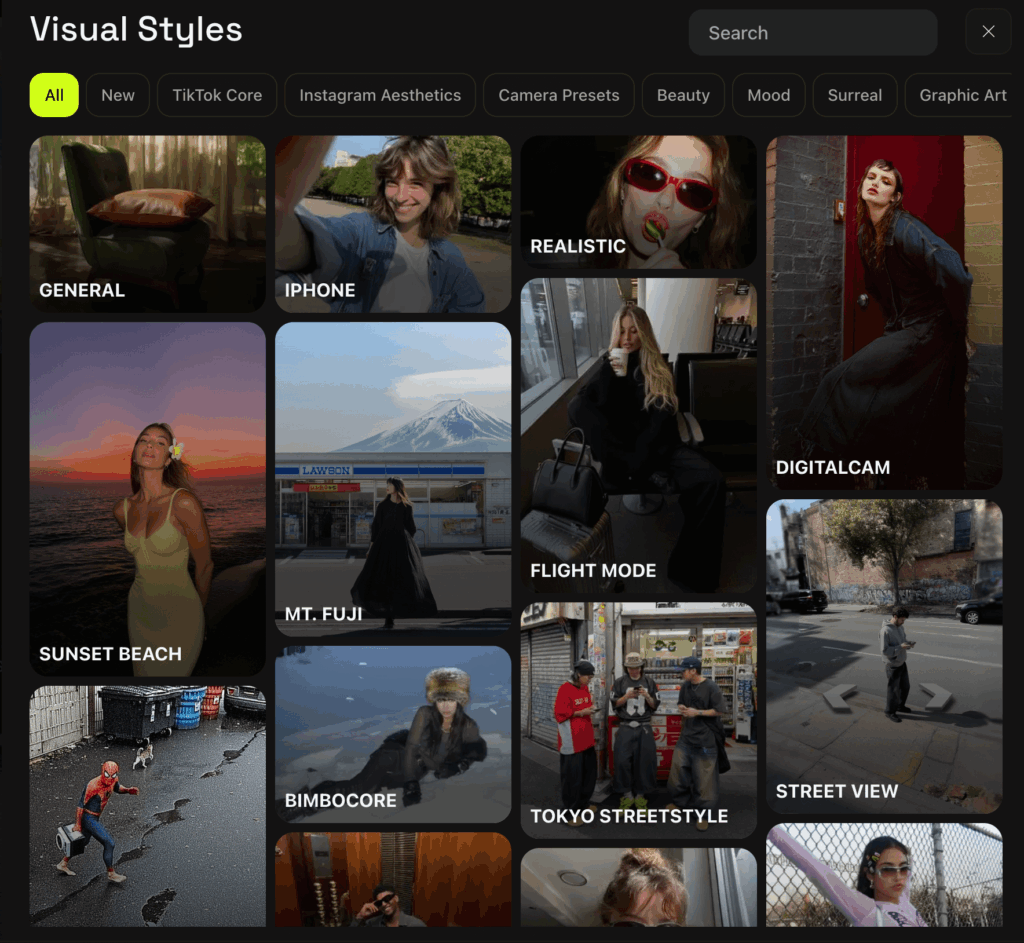
Higgsfield Soulには「Visual Style」と呼ばれるテンプレートが用意されています。
ビジュアルスタイルを指定することで、イメージに近い画像を生成しやすくなります。
指定方法は簡単です。
まず、下の画像を参考にしてクリックしてください。
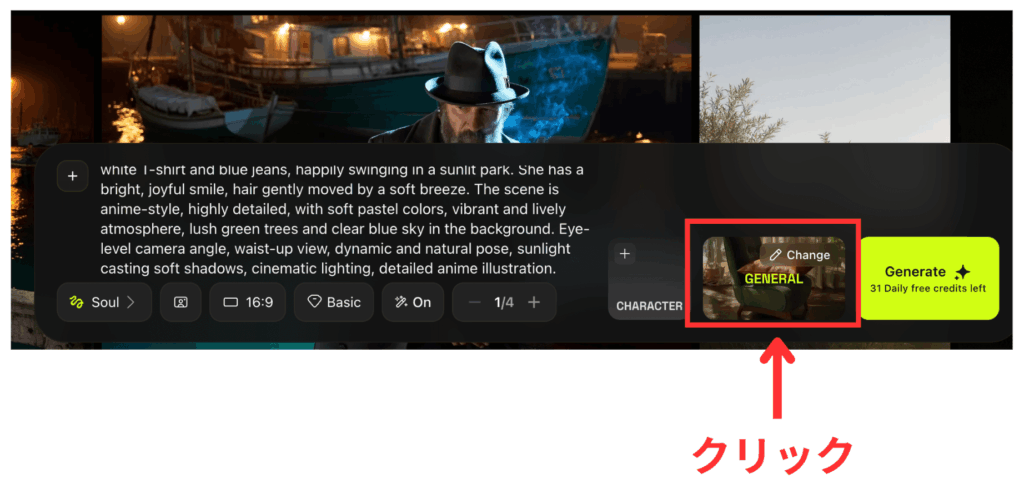
クリックすると、下の画像のようにVisual Style一覧が表示されます。
この中からスタイルを選択してください。
選択すれば、スタイルが適用された画像が生成されます。
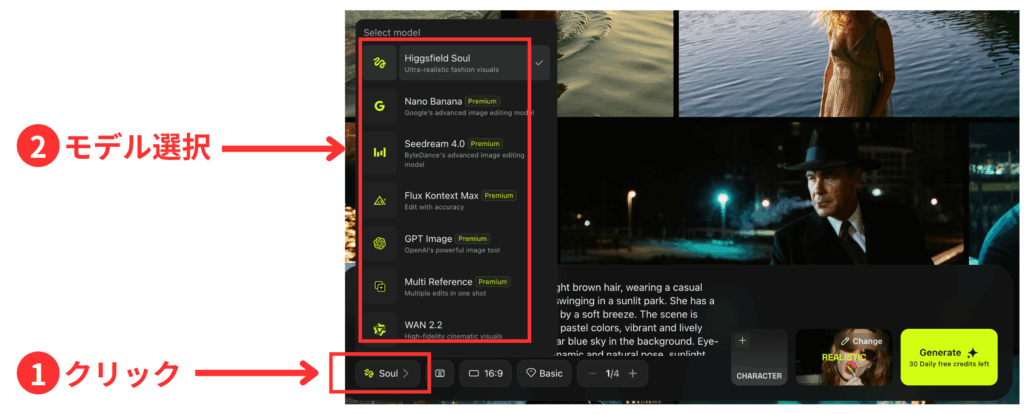
Higgsfield Soul以外のモデルを使いたいときは、下の画像を参考にしてモデルを選択してください。
クリックするだけでモデルを変更できます。
Higgsfield DOPで動画生成する方法
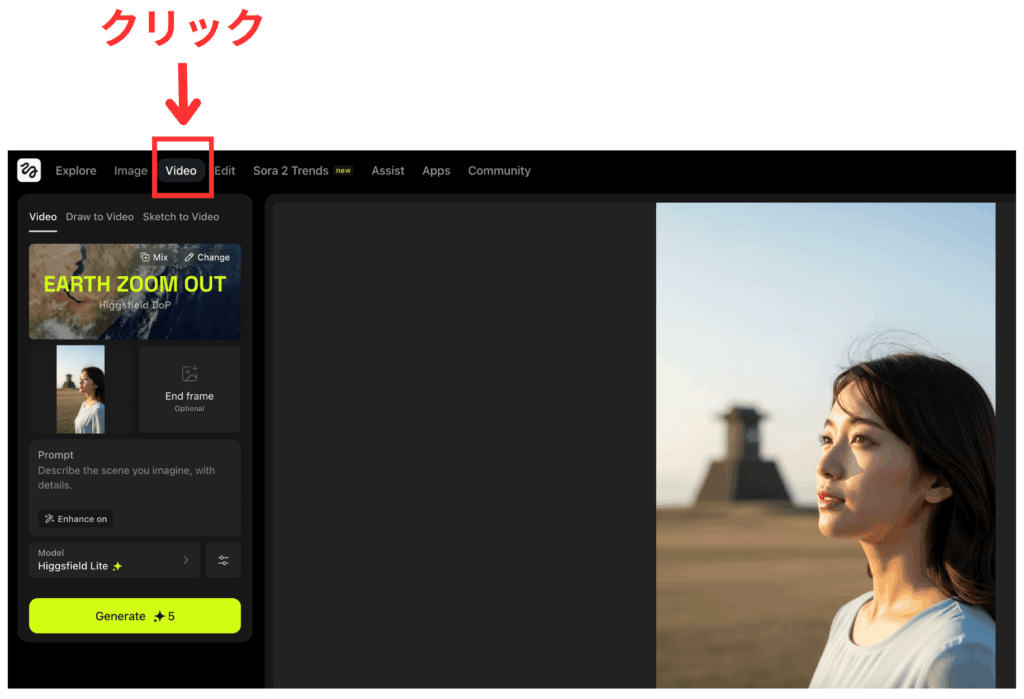
Higgsfieldで画像から動画生成する方法を紹介します。
まずは「Video」をクリック。
クリックすると、Higgsfieldの動画生成モデル「Higgsfield DOP」が自動的に選択されます。
カメラワーク・VFXを選択
次は、下の画像内の「EARTH ZOOM UP」と表示されている部分をクリック。
ここはカメラワーク・VFXを指定する部分です。
クリックし、適用するエフェクトを選んでください。
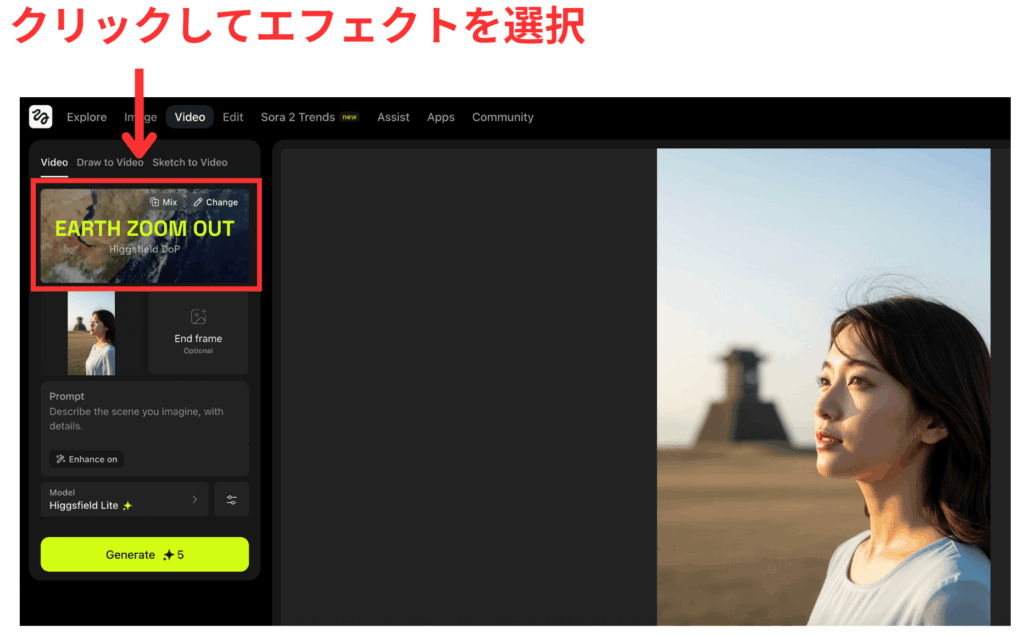
Higgsfieldは合計100種類以上のカメラワーク・FXが用意されています。
選ぶのは大変ですが、サンプルなどを見ながら選んでください。
参照する画像&プロンプトの入力
カメラワークを選んだら、あとは
- 参照する画像
- プロンプト
- Advanced
この3つを設定するだけです。
それぞれの位置は下の画像を参考にしてください。
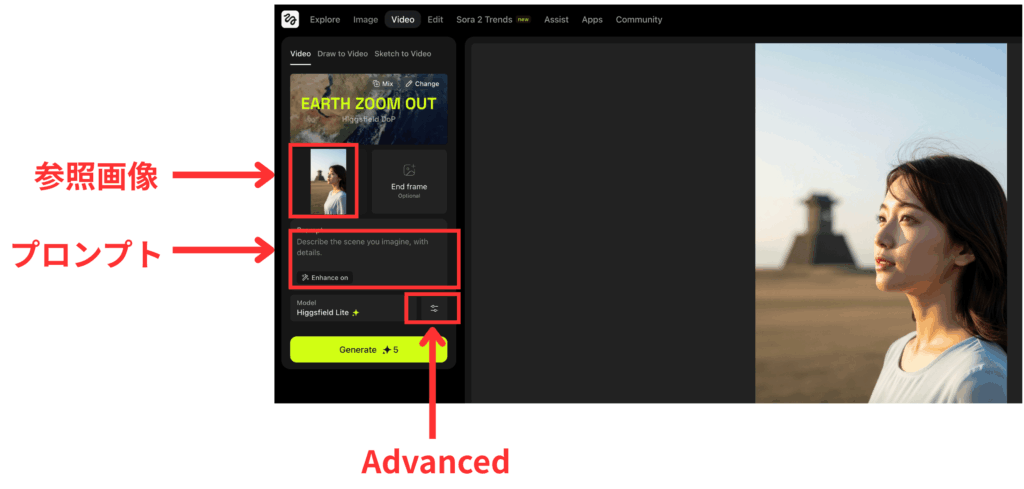
「参照画像」はスタートフレーム・エンドフレームの両方を指定できます。
生成される動画をしっかりコントロールしたい方は両方とも設定してください。
プロンプトを入力するところに「Enhance」をon・offに設定できる部分があります。
この「Enhance」とは、Higgsfield側でプロンプトを補足・強化する機能です。
初心者の場合はonにした方がよい動画ができやすいので、慣れるまではonにしておきましょう。
「Advanced」の項目では動画の秒数を3秒(基本は5秒)にしたり、Seed(シード値)を選ぶことができます。
このあたりは慣れてからで良いと思います。
初心者の方は何もいじらないでOKです。
明るい緑色の「Generate」ボタンをタップすると動画の生成が開始します。
私が使ったタイミングでは、1つの動画を生成するのに数分〜10分くらいかかりました。
生成が完了するまで待ちましょう!
Higgsfieldの使い方の解説は以上となります。
ここからは、Higgsfieldのカメラワーク・VFXを使って作った動画を紹介します。
【カメラワーク別】Higgsfieldで生成した動画例
ここからは「ぽんず🐕 AIクリエイターさん」と筆者がHiggsfieldで生成した動画をカメラワーク別で紹介します。
Higgsfieldには100種類以上のカメラワークがあるので、ここでは一部しか紹介できません。
けれどHiggsfield公式サイトにいけばカメラワークと、それぞれのカメラワークのサンプル動画(複数)を確認できます。
興味がある方はぜひHiggsfield公式サイトをチェックしてください。
① Bullet Time
はじめに紹介するのは、Bullet Time(バレット・タイム)。
Bullet Timeは映画やビデオゲームでよく使われるカメラワークの一つ。
簡単に言えば
「時間がゆっくり進んでいるときに、カメラがいろんな角度から動き回るカメラワーク」
です
映画「マトリックス」で主人公のネオが銃を避ける、あの有名シーンで使われたので見覚えがある人が多いと思います。
ぽんず🐕 AIクリエイターさんが生成したBullet Timeの動画はこちら↓
おしゃれですね!
私が生成した動画とプロンプトは以下です。
A woman in a sleek black leather coat leans back, her expression focused and fierce, as she narrowly avoids a barrage of bullets suspended in mid-air around her. Her long hair flows dramatically backward, seemingly frozen in the chaos of the moment. Smoothly rotating around her, the camera captures the golden bullets hovering, glinting in the soft, muted light from the towering glass buildings behind her. Rain cascades gently in the background, creating reflections on the slick pavement that amplify the tension of the scene. The air is charged with energy, a moment teetering between danger and grace, as time stands still in this breathtaking instant of survival. The emotional weight of fear and determination hangs heavy in the atmosphere, making this surreal tableau all the more striking.
② ARC
次に紹介するのは「ARC(アーク)」です。
カメラが被写体の周りを円弧(アーク)を描くように動く動きのことを指します。
このカメラワークは、映画やテレビ番組、特にアクションシーンでよく使われます。
A man stands alone on the pier, smoking a cigarette, lost in thought as he gazes at the water. The camera arcs gently around him, revealing the shimmering reflections from distant lights on the harbor. This movement is slow and contemplative, capturing the nuances of his expression and the smoke wafting upward. The scene is bathed in a moody, teal hue, enhancing the dramatic lighting that creates a stark contrast with the dimness surrounding him. The emotional impact resonates with a sense of isolation and intrigue, echoing the stillness of the night.
③ Focus Change
次に紹介するのはFocus Change(フォーカスチェンジ)
Focus Changeとは、カメラのピント(フォーカス)を、ある被写体から別の被写体に意図的に切り替える技法です。
たとえば
「手前の人にピントが合っていたのが、奥にいる別の人にピントがスーッと移る」
というように、見る人の注意を誘導したり、ドラマ性を演出するために使われます。
ぽんずさんの投稿を見てみましょう。
カメラの焦点が料理→シェフに変化してるのがわかりますね。
補足すると、この動画は以下の2つのカメラワークを組み合わせて作られています。
- Focus Change
- Arc right(カメラが被写体の右側を円を描くように移動するカメラワーク)
Higgsfieldは1回の動画生成で最大2つのカメラワークを設定できます。
なので、1回の生成でこのような動きのある動画を作ることも可能です。
④ Dolly Left
次に紹介する「Dolly Left(ドリー・レフト)」は、カメラが左に向かって移動するカメラワークです。
ちなみに、右に向かって移動する動きは「Dolly right(ドリー・ライト)」と呼ばれます。
The scene opens with a young Japanese woman seated on a simple wooden chair, her serene smile radiating pure happiness against a backdrop of vibrant green grass under a clear blue sky. The camera dollies left, revealing the vastness of the field, where the golden sunlight dances upon the delicate blades of grass, creating a shimmering contrast to her deep green dress. As the movement continues, a gentle breeze sweeps through the scene, causing her hair to flow like silken waves and the grass to sway softly, adding a rhythmic pulse to the tranquil atmosphere. The light warms her skin, casting soft shadows that accentuate her relaxed posture as she stretches with carefree delight. This expansive view hints at the endless possibilities that lie beyond the meadow, mirroring the freedom she feels in this joyful moment of solitude. The wind carries with it the whispers of nature, inviting the viewer to share in her blissful connection to the world.
⑤ Timelapse Landscape
次はTimelapse Landscape(タイムラプス・ランドスケープ)。
このカメラワークは風景を撮影した映像でよく使われる技法の一つで、時間の経過を実際の経過よりも早く表現する手法です。
風景や虫の撮影など、自然界のドキュメンタリー等を撮影する時によく使われる手法です。
A serene timelapse landscape depicting a majestic mountain, snow-capped and towering over a still lake at dawn. The camera remains static, capturing the mountain’s reflection shimmering on the water’s surface. As time passes, the soft morning light gradually brightens, illuminating the slopes and revealing the surrounding lush greenery. Slowly, shadows stretch and clouds drift across the sky, creating a peaceful yet dynamic atmosphere. Emphasize the transition of the light as day breaks, highlighting the stillness of the water and the enduring presence of the mountain.
⑥ Crash Zoom In
Crash Zoom In(クラッシュ・ズーム・イン)は、カメラが非常に素早くズームイン(被写体に急接近)する動きを指します。
映画等で瞬間的なインパクトや驚きの効果を生み出したい時によく使われるカメラワークですね。
On a sunlit rooftop, the quiet hum of the city fades against the fierce, swirling wind that ruffles the man’s tailored suit. He stands poised, a solitary figure against the vast blue sky dotted with fluffy clouds, gazing intensely into the distance. Just then, the camera lunges forward in a crash zoom, bridging the space between the viewer and his expression—conflicted yet resolute. As we draw closer, the tension in his jaw and the slight glint of fear in his eyes become palpable, echoing the weight of his murmured, ‘There…’. The gun rests steadily in his hand, a stark reminder of the peril that looms in the air, magnifying the urgency and isolation of his moment.
⑦ CAR Grip
「CAR Grip(カー・グリップ)」は車両に取り付けたカメラ機材を使って、車の動きに合わせてスムーズに撮影する技法です。
A silver sedan rolls along a winding dirt path, flanked by lush green hills under a bright blue sky dotted with fluffy clouds. The camera is locked on the side window, capturing a young woman with long hair, joyfully leaning out, her smile radiant and carefree. Her casual orange shirt complements the sunlit atmosphere, while the gentle breeze stirs her hair, embodying a sense of freedom and spontaneity. The rhythmic sound of the car’s movement syncs with the chirping of birds and the whisper of rustling leaves, creating an uplifting ambiance. Sunlight dances through the trees, casting playful shadows on the car’s glossy surface, enhancing the feeling of a perfect day for adventure.
⑧ FPV DRONE
FPV DRONE(エフピー・ヴィー・ドローン)は、ドローンにカメラを取り付けて、そのカメラの映像を自分の目で見てるような感覚を味わえるカメラワークです。
ドローンが普及したこともあり、最近テレビや映画で見かける機会が増えた技法です。
Soaring above the ancient ruins of Machu Picchu, the camera glides effortlessly over the lush terraces and weathered stone structures, revealing a breathtaking panorama of towering peaks and valleys beyond. Sunlight bathes the landscape in a warm glow, highlighting the intricate stonework and verdant patches of grass as it weaves between crags and cliff faces, all while the air thrums with the history of a civilization long past. The distant echo of footsteps on gravel adds a heartbeat to the tranquility, as a solitary figure stands in awe, framed by the majestic backdrop of the Andes Mountains. As the camera dips lower to capture the intricate maze of paths, it senses the cool breeze swirling around ancient stones, bringing a refreshing contrast to the resolute structures. Motion builds as the camera sweeps around a towering peak, the expansive view of the ruins unfurling below like a tapestry woven with stories of the past — culminating in a breathtaking pull-away, revealing the majestic landscape stretching into an endless blue horizon.
⑨ 360 Orbit
360 Orbit(360オービット)は、被写体を中心に360度回転しながら撮影するカメラワークです。
下の動画を見てもわかると思いますが、シンプルなのに面白い映像が作れるので、初心者にはかなりおすすめです。
The camera begins a slow 360-degree orbit around a young girl dressed in a flowing, deep teal dress. As she twirls barefoot, the soft textile of her dress dances around her legs, creating a mesmerizing rhythm. Her long hair flows effortlessly, catching the light as she spins. The warm, muted backdrop enhances the vibrancy of her dress, casting gentle shadows that shift with her movement. As the shot evolves, her serene expression reflects a sense of joy and liberation, inviting the viewer into her moment of bliss. The orbit emphasizes both the grace of her motion and the beauty of her surroundings, punctuated by the whisper of the fabric against the air.
The sleek, futuristic spacecraft hovers in the depths of space, its sharp, elongated nose cutting through the darkness like a dart. Its white surface is sleek and polished, contrasted by the intricate black detailing along the hull, hinting at advanced technology. The camera begins a slow 360-degree orbit around the vessel, revealing its elegant curves and unique design from every angle. As the orbit progresses, stars twinkle majestically in the background, creating a serene yet powerful atmosphere. The ship’s contours reflect the distant starlight, adding to its allure, while a faint hum reverberates, suggesting energy and motion. The shot culminates as the camera draws closer, capturing the intricate details of its machinery, infusing a sense of wonder and adventure as it glides silently through the cosmic expanse.
【VFX別】Higgsfieldで生成した動画例
カメラワークの次はHiggsfieldに搭載されてるVFXを活用した動画を紹介します!
ここでは、ぽんず🐕 AIクリエイターさんが生成した動画を中心に紹介します。
① Action Run&Set on Fire
「Action Run&Set on Fire」は複数の動きとVFXがセットになったエフェクトです。
簡単に言えば、全力疾走の後に炎に包まれるエフェクトですね。
といってもイメージが湧かないと思うので、「Action Run&Set on Fire」で作られた動画を見てみましょう!
ショート動画向きのインパクトのある動画を作れるエフェクトなので、TikTok等を使ってる人はぜひ活用してください!
② Basketball Dunks
次に紹介するのは「Basketball Dunks」。
名前そのまま、バスケットボールでダンクするVFXです。
この動画のように、女性や子供がダンクを決める姿はインパクト大!
動画生成AIを使ってインパクトのある映像やCMを作りたい人におすすめのVFXです。
Higgsfieldで生成したリップシンク動画を紹介
最後に、Higgsfieldで生成したリップシンク動画を実写版・アニメ版に分けて紹介します。
まずは実写版からです↓
ご覧の通り、Higgsfieldでは高品質なリップシンク動画が作れます。
動画の終盤で、わずかに音声と口の動きがズレる場面はありましたが、それでも驚くほどの完成度です。
リップシンク機能が公開されたばかりであることを考えれば、そのクオリティの高さは特筆すべきでしょう。
次はアニメ版のリップシンク動画を紹介します↓
実写版と比べると、正直なところクオリティは落ちます。
やや不気味な感じの動画になってしまいました・・・。
Higgsfieldでリップシンク動画を作れるのはProプラン以上に課金してるユーザーのみです。
もし無料でハイレベルなリップシンク動画を作りたいなら、HeyGenやHedraを使ってください。
この2つは当サイトの調査では、どちらもHiggsfield以上のクオリティの動画を生成できました。
とくにHeyGenの実写版は素晴らしい完成度です。
HeyGenなら無料会員でもこのような動画を1ヶ月に3回生成できます。
HeyGenやHiggsfieldで生成したリップシンク動画を比較した記事は以下です↓
それぞれの動画のクオリティを比較したい方はぜひチェックしてください。
